TAG INSPECTOR BY INFOTRUST

Automated Website Privacy & Consent Monitoring

Audit, diagnose, and manage privacy risk to close the gap between regulations, your consent policies, and reality.

Already a Tag Inspector user? Log in →

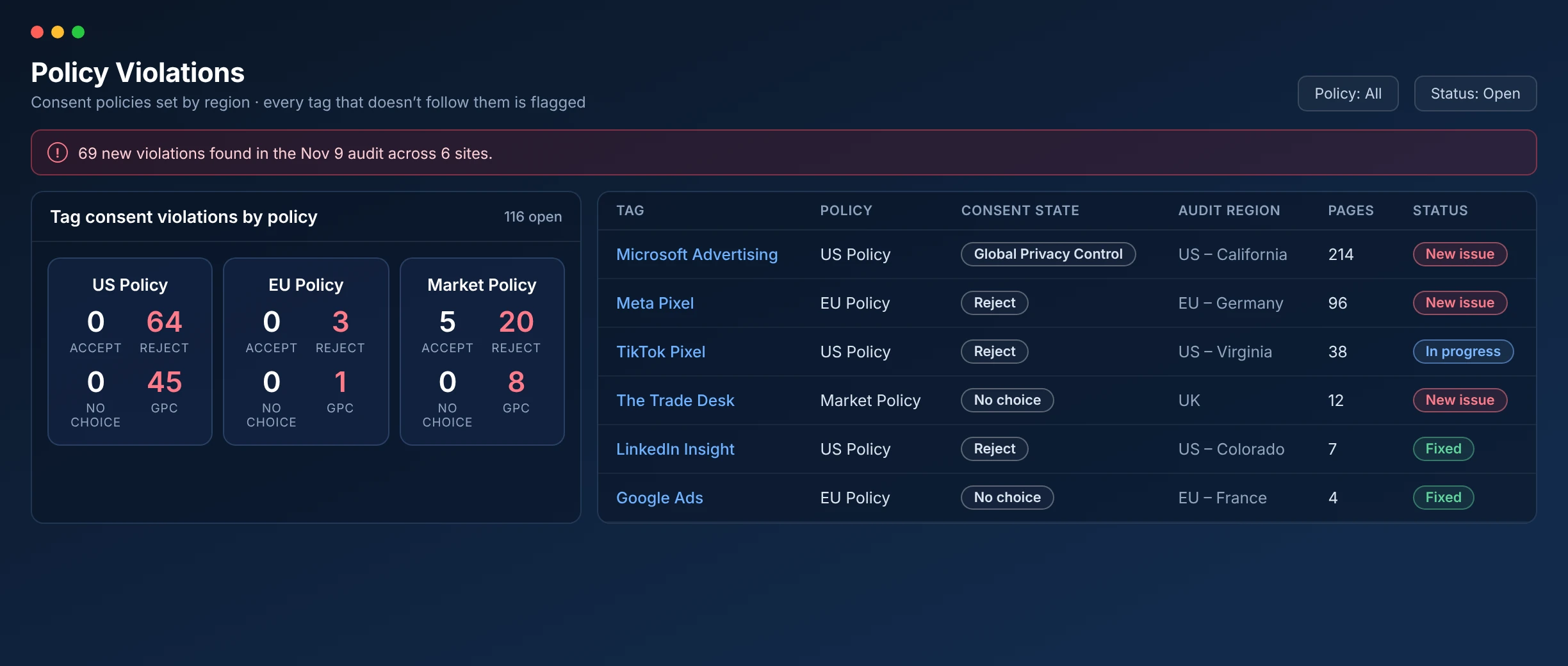
Tag Inspector Compliance Dashboard: sites, tags, cookies and consent violations by policy

TRUSTED BY INDUSTRY LEADERS

HaleonNestléCarnivalTaxSlayerPlanet FitnessL’OréalNASACOTY
  • Reduce regulatory risk and
    avoid costly penalties

    Catch consent violations and PII leaks
    before they turn into fines.

  • Cut compliance workload
    and complexity

    Automated monitoring that scales across
    every site, brand, and region.

  • Pinpoint violations and resolve
    them faster, reducing your risk

    Developers see exactly what broke,
    where, and why.

Consent Monitoring Built for Scale

Take the complexity out of compliance monitoring, with site-level detail and global management in one place.

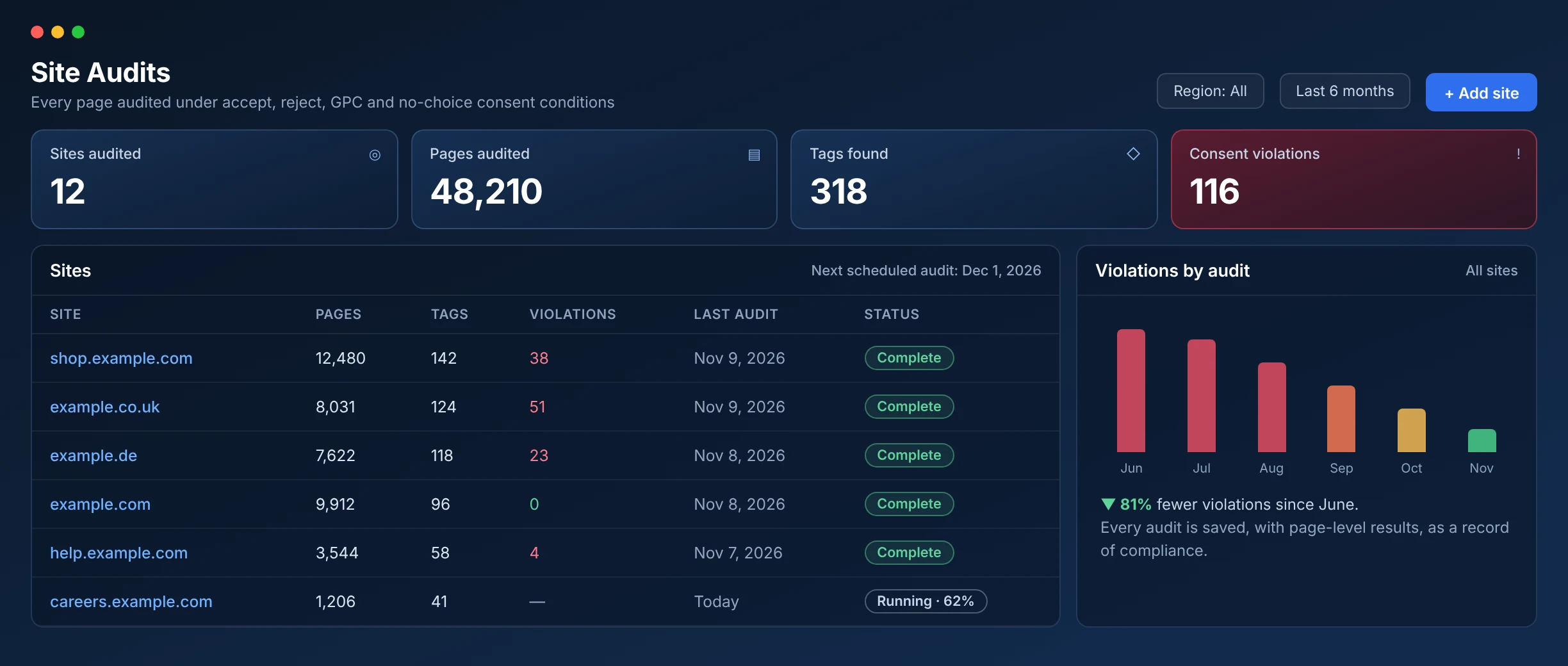
Tag Inspector Site Audits screen: sites audited, pages, tags and consent violations, with violations falling audit over audit (sample data)

Audit every site at once

Audit thousands of pages per site, with a saved history as proof of compliance.

The Right Fit for Your Team’s Privacy Expertise

RUN IN-HOUSE

Self-Managed Tag Inspector License

  • Automated consent compliance monitoring
  • Clear visibility into every consent violation
  • Documented proof of compliance
Explore Packages →

MANAGED FOR YOU

Fully Managed Consent Program

  • Every audit reviewed and prioritized for you
  • Violations fixed in your CMP and tag manager
  • Ongoing consent policy guidance as regulations change
Learn About Managed Consent →

Built for the Teams Who Own Website Privacy

Privacy, legal, and IT teams each need something different. Here’s how they use Tag Inspector.

Data Protection Officers

See your website privacy risk in one place. Keep tag and cookie lists, consent policies, and audit history ready for any review.

IT Directors

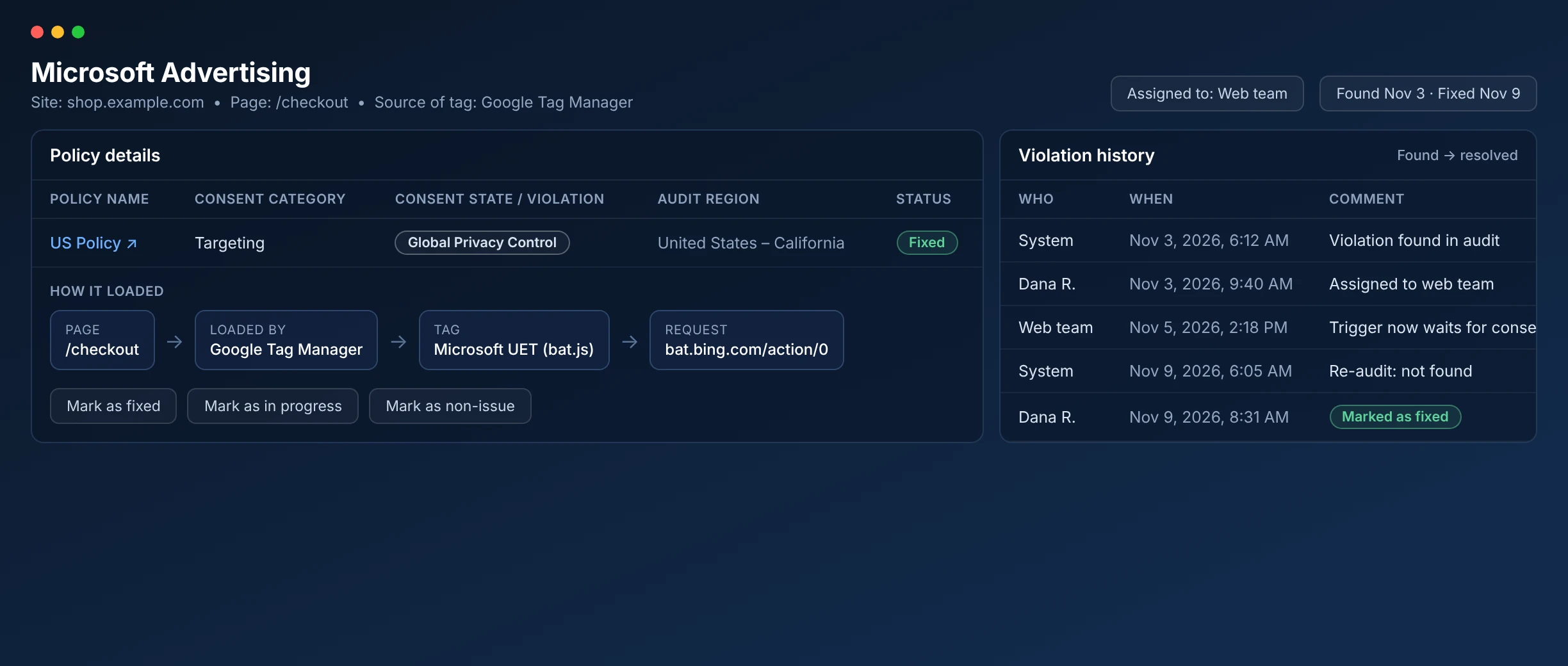
Set it up once and audits run on their own. When something breaks, see what it is, where it is, and how it got there, so your team can fix it fast.
Legal Counsel

Get a defensible record without becoming the bottleneck. Every tag, cookie, and violation is documented, so you can hand auditors or regulators proof on demand instead of chasing it down.


Frequently Asked Questions

How can I verify if my website is privacy compliant?

Privacy regulations across the globe (GDPR, CCPA, LGPD, CIPA, etc.) all carry core requirements related to user notice, choice, and data protection. The foundation of compliance is understanding all data collection happening on your website and testing that controls are properly in place. The best way to verify privacy compliance starts with proactive auditing with Tag Inspector.

Get Free Audit →
How does Tag Inspector audit websites for privacy risk?

Tag Inspector core auditing looks for two primary types of website privacy risk: consent compliance and PII leakage.

Consent Compliance
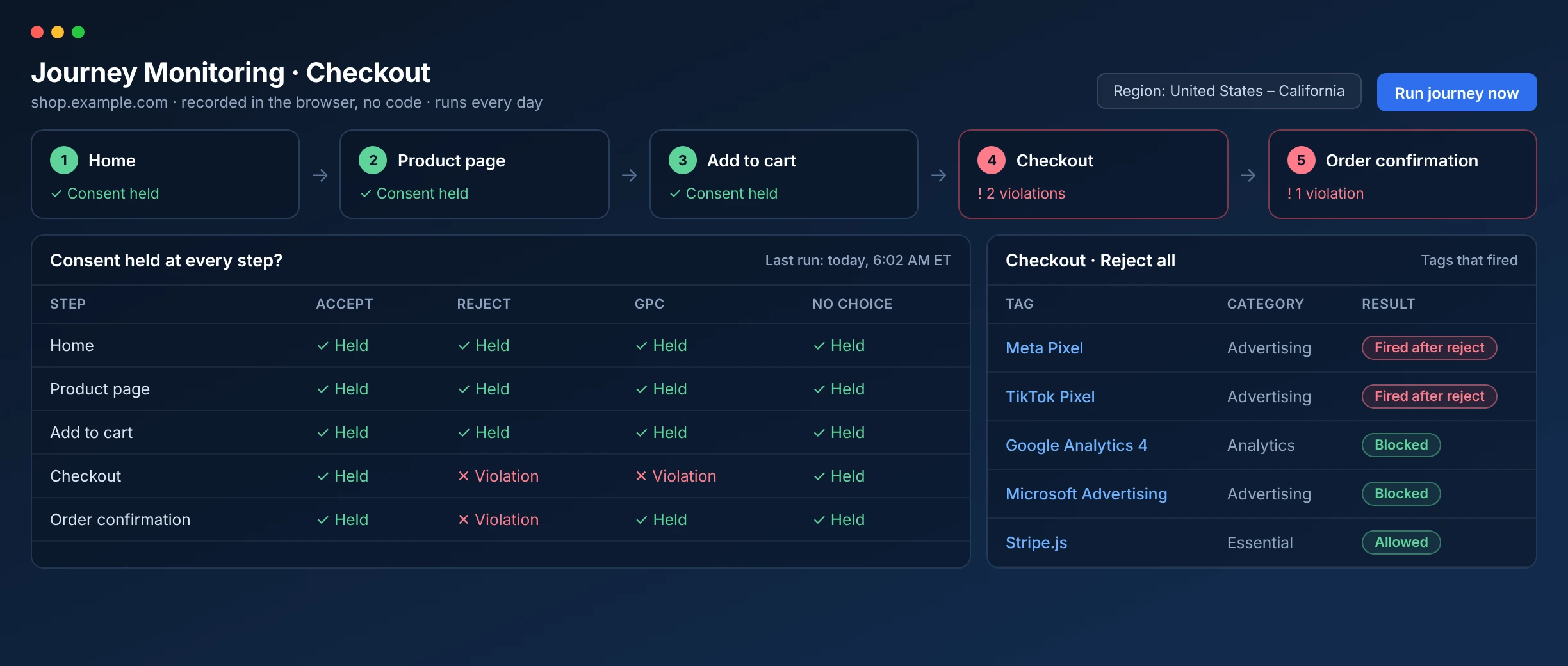
Tag Inspector consent auditing leverages a scanning method to simulate users accessing various pages of your website(s). Scans simulate users from selected locations as well as all primary consent conditions (users that accept consent, reject consent, reject consent via Global Privacy Control, and users that do not make a consent selection). All pages are loaded with the resulting tracking tag and cookie behavior captured and presented in reporting.

PII Leakage
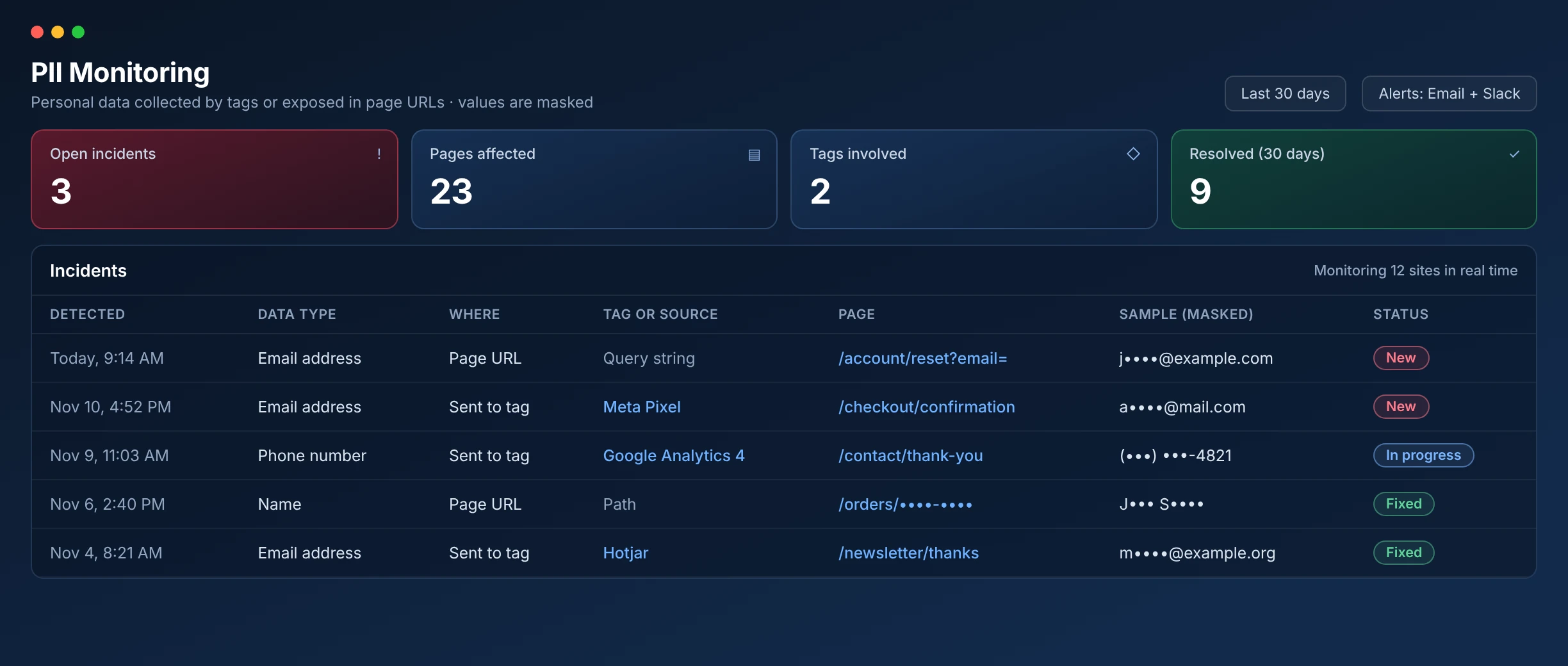
Tag Inspector PII monitoring is a tag-based solution that monitors for instances of clear-text Personally Identifiable Information being collected by tags and/or PII being surfaced in page URLs. Upon identification of likely PII, the offending behavior is registered for further evaluation by the system and incident reporting.

Book a Demo →
What privacy regulations does Tag Inspector audit for?

Tag Inspector audits surface all tracking tag and cookie behavior on your website(s) to highlight privacy compliance risk. All global regulations can be tested against with the reporting and ability to input customized Consent Policies for automated verification of approved tag behavior.

Get Free Audit →
What tracking tags does Tag Inspector support?

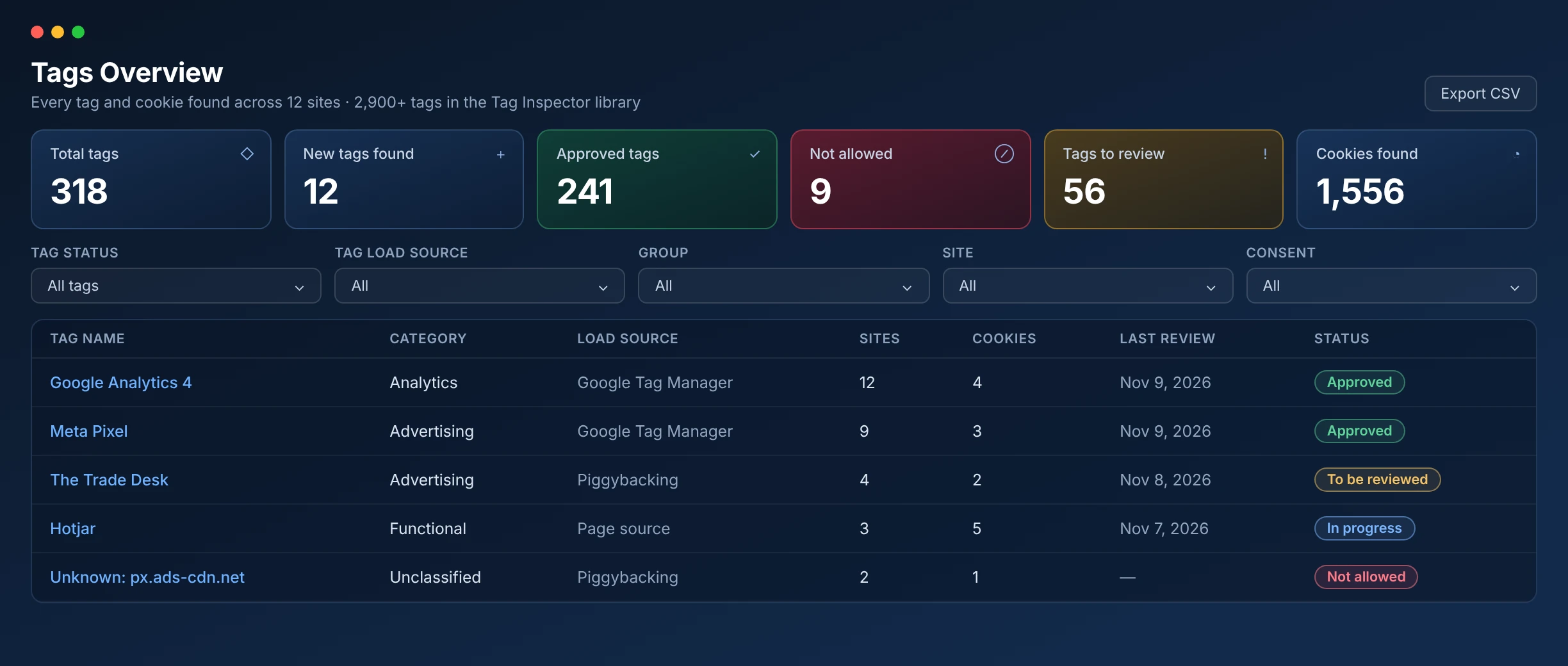
Tag Inspector has an industry-leading 2,900+ categorized tags documented in our tag library database. The more site audits we run, the more this library continues to grow and update. With every audit run by Tag Inspector, we find all the tracking tags that are classified and build the reports you see in the interface. However, for all unclassified or unknown tracking requests on a website, we collect those in a separate repository to review. If there are any common requests found that are not classified, our team of qualified governance professionals research the tag and script to get the information needed to classify it in our tag library.

Since Tag Inspector can find image tags, JavaScript files, and other forms of tags, we update the tag library on a regular basis.

View the list of supported tags →
What is a cookie and how does it work?

A cookie is a small text file set by a website on your browser. Cookies allow a website to store information that can be accessed later while a user navigates a website or, in the case of third-party cookies, the broader internet. Information commonly stored in cookies include user identifiers, saved credential information, the user’s browsing history on a website, and some insights about you based on your internet activity.

How can I license Tag Inspector?

Tag Inspector licenses are purpose-built to fit your unique website ecosystem. Standard licensing options and available add-ons can be viewed on the packages page, or contact our team.

Explore packages →
Does Tag Inspector have an option to quickly view the tags loading on a single page?

Tag Inspector is built for comprehensive website privacy auditing at scale. For quick, single page reviews, it’s best to use the companion plug-in Tag Explorer.

Tag Explorer uses the same expansive 2,900+ tag library as our award-winning Tag Inspector product, so you will be confident we will find the tags you are looking for. You can install the Tag Explorer Chrome extension here.

What is a tracking tag and what is Tag Inspector?

What is a tracking tag?
A tracking tag is a small piece of code (JavaScript) that is loaded on your website which typically calls an external application (Google Analytics, Facebook etc.), to collect useful data about visits to your website. Most tags collect information about user visits, like pages viewed, time spent on the site, elements of the site they interacted with, etc. Many (most) tags collect Personal Information or Personal Data and some tags collect PII (Personally Identifiable Information). Identifier information is very useful to marketers, but also the target of regulation from the EU (GDPR), U.S. State Laws (CCPA, CPA, VCDPA, etc), and privacy legislation around the globe.

What is Tag Inspector?
Tag Inspector is a proprietary browser-based application developed by InfoTrust that audits and validates information about the tracking tags and cookies loading on your website. Tag Inspector can help you identify and mitigate privacy compliance risks and manage privacy risk exposure from data collection on your website(s). Book a demo.

Get Free Audit →
What are marketing tags and pixels?

A tracking tag (or often called pixel) is a short snippet of JavaScript (code) that collects data from users on your website. In the context of marketing/advertising tags and pixels, they are often collecting some information about the visitor to a website and their behavior on the site. This is then sent back to the respective marketing/advertising platform to be processed and reported. The collection of data via tracking tags on a website often requires privacy compliance considerations for user notice, consent, and access/deletion.

100+

CIPA threats closed

$0

settlements paid

$2M+

average risk eliminated

90%

faster remediation

Get Your Assessment

Talk To Us

Receive Book Updates

Fill out this form to receive email announcements about Crawl, Walk, Run: Advancing Analytics Maturity with Google Marketing Platform. This includes pre-sale dates, official publishing dates, and more.

Search InfoTrust

Leave Us A Review

Leave a review and let us know how we’re doing. Only actual clients, please.